
ESPN Unlimited Is Included. Activate Now.
ESPN Unlimited is included at no extra cost with Spectrum TV®. Just activate your account to start streaming.
How to Activate Your ESPN Unlimited Subscription
Follow the steps or watch the activation video to get started.
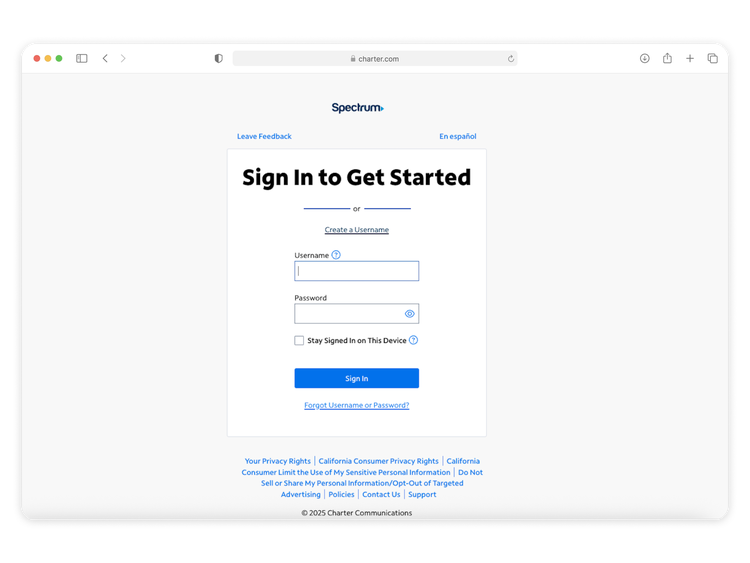
STEP 2
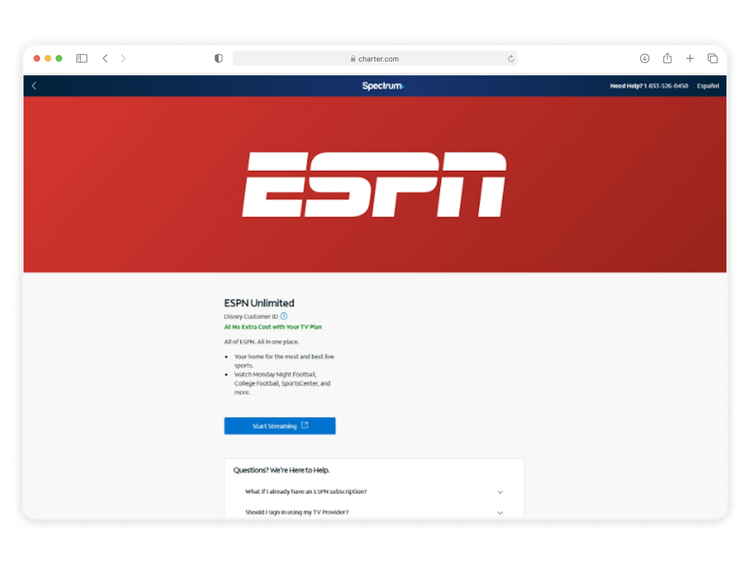
Find ESPN Unlimited under services
Go to "Services" and find ESPN Unlimited. On the next page, click "Get Started."
STEP 3
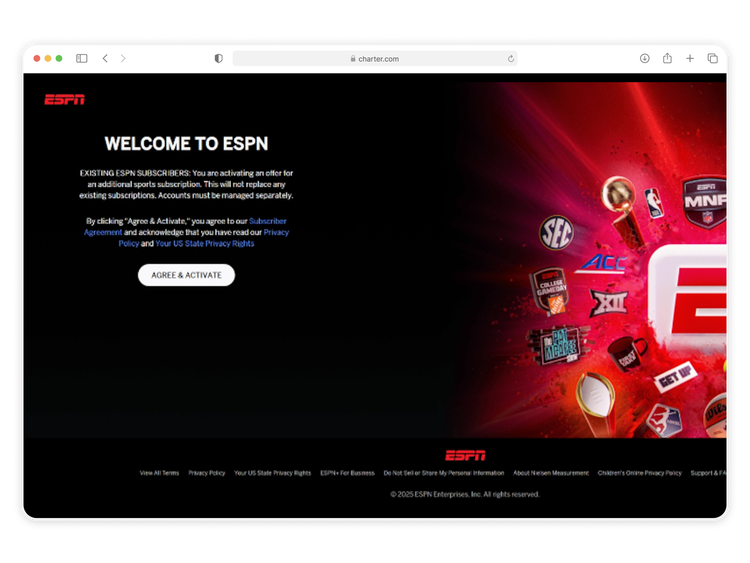
Activate ESPN Unlimited
Click “Agree & Activate” to continue.
STEP 4
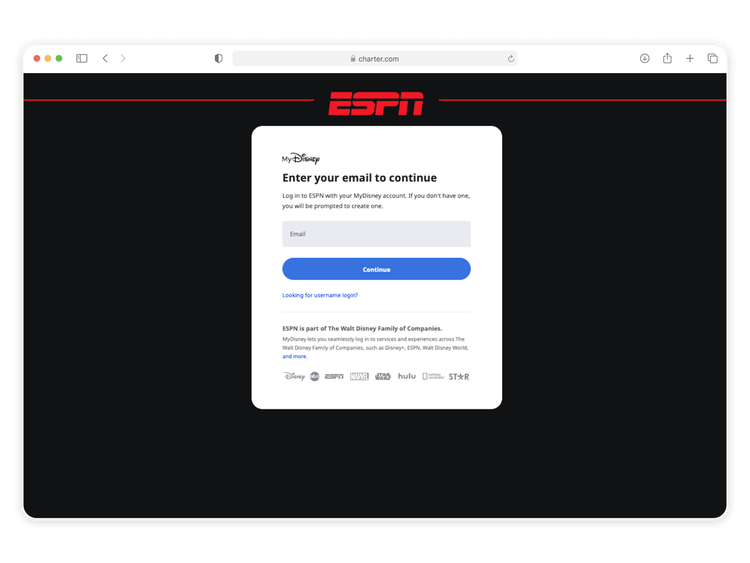
Login or create your ESPN account
Sign in through MyDisney and either login if you have an existing account or create an account if you are using a new email address.
If you have an existing ESPN subscription you can use your existing credentials. You’ll receive an email with details on how to manage your subscription.
Frequently Asked Questions
What if I need help activating my ESPN Unlimited subscription?
Does ESPN Unlimited cost extra?
One ESPN Unlimited subscription is included at no extra cost with Spectrum Stream TV Signature, Stream TV Pro and Stream TV VIP.
What if I already have an ESPN subscription?
This is an offer for an additional ESPN subscription. This will not replace any existing subscription(s) you may already have. Subscriptions must be managed separately. Must maintain eligible services to retain ESPN Unlimited subscription.
If you use existing, active credentials for your subscription(s), you will receive an email after activation regarding subscription management options. For more information, visit the ESPN support site.
If you have other ESPN subscriptions through third parties, you can manage those subscriptions separately.
If you use existing, active credentials for your subscription(s), you will receive an email after activation regarding subscription management options. For more information, visit the ESPN support site.
If you have other ESPN subscriptions through third parties, you can manage those subscriptions separately.
If I already pay for ESPN separately, can I get a refund or credit?
No. The ESPN Unlimited subscription included with your plan is separate from any existing subscriptions. Refunds or credits are not available, but you can manage your other subscriptions at any time.
Will I lose access to ESPN if I change my Spectrum TV plan?
Spectrum customers who disconnect their TV plan or downgrade to a non-eligible TV offering will lose access to the complimentary ESPN Unlimited subscription at the same time they lose access to other programming. Visit The Spectrum App Store to explore other options for your ESPN Unlimited subscription.
If a streaming app raises their price, will the cost of Spectrum TV plan go up?
Streaming services occasionally adjust their pricing, but Spectrum covers those changes for included apps - so there’s no extra cost passed on to you. That means you can enjoy your favorite entertainment in one place, without worrying about surprise increases or managing multiple subscriptions.
Have You Activated All Your Apps?
There are even more included apps waiting for you. Activate them all to stream your favorites at no extra cost.
HBO Max Basic With Ads
Activate HBO Max Basic With Ads here if you are an eligible Stream TV Signature, Stream TV Pro or Stream TV VIP customer.
Disney+, Hulu Bundle
Activate Disney+, Hulu Bundle here if you are an eligible Stream TV Signature, Stream TV Pro or Stream TV VIP customer.
Paramount+ Essential
Activate Paramount+ Essential here if you are an eligible Stream TV Signature, Stream TV Pro or Stream TV VIP customer.
Peacock Premium with Ads
Activate Peacock Premium with Ads here if you are an eligible Stream TV Signature, Stream TV Pro or Stream TV VIP customer.
AMC+
Activate AMC+ here if you are an eligible Stream TV Signature, Stream TV Pro or Stream TV VIP customer.
discovery+
Activate discovery+ here if you are an eligible Stream TV Signature, Stream TV Pro or Stream TV VIP customer.
FOX One
Activate FOX One here if you are an eligible Stream TV Signature, Stream TV Pro or Stream TV VIP customer.
ViX Premium with ads
Activate ViX Premium with ads here if you are an eligible Stream TV Signature, Stream TV Pro or Stream TV VIP customer.
Tennis Channel
Activate Tennis Channel here if you are an eligible Stream TV Signature, Stream TV Pro or Stream TV VIP customer.
Don’t have Stream TV Pro? Click here to upgrade.
Don’t have Stream TV Pro? Click here to upgrade.
DC-485, DC-368, DC-543